Thinking effort
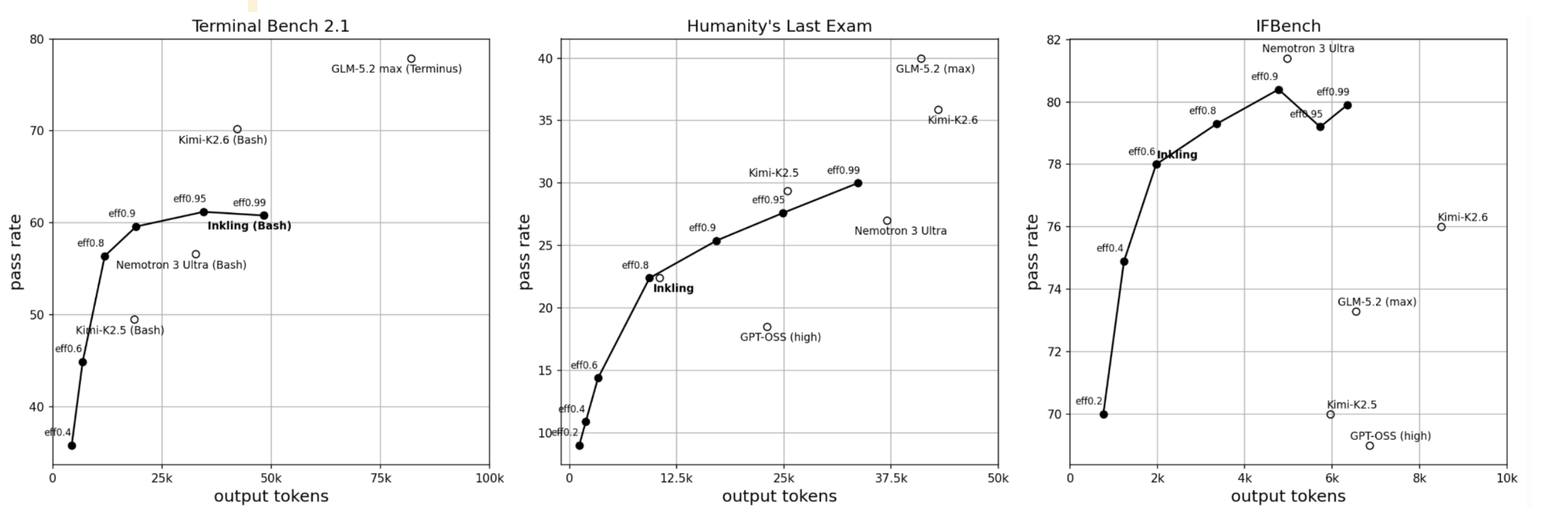
Inkling supports continuous reasoning-effort conditioning. Set effort to a finite floating-point value from 0.0 inclusive up to, but not including, 1.0. Larger values generally encourage more reasoning, but do not guarantee longer responses or higher accuracy on every sample.
Choose an effort level
These presets are useful starting points when sweeping reasoning effort:
| Name | none |
minimal |
low |
medium |
high (default) |
xhigh |
|---|---|---|---|---|---|---|
| Effort | 0.0 |
0.1 |
0.2 |
0.7 |
0.9 |
0.99 |
These are the same scalar values the OpenAI-compatible API uses for its named reasoning_effort presets. The Cookbook renderer accepts any finite scalar in the range [0.0, 1.0).
Before creating training data, use sample_reasoning.py to sweep effort values for your task and choose the value that produces the desired behavior.
Generate at a fixed effort
Pass your chosen effort to the Cookbook renderer:
from tinker_cookbook.renderers import Message
from tinker_cookbook.renderers.tml_v0 import TmlV0Renderer
from tinker_cookbook.tokenizer_utils import get_tokenizer

renderer = TmlV0Renderer(get_tokenizer("thinkingmachines/Inkling"))
messages = [Message(role="user", content="Solve this problem step by step.")]
prompt = renderer.build_generation_prompt(messages, effort=0.9)
When effort is omitted, the renderer uses high effort (0.9). The renderer inserts a Thinking effort level system message before the first non-system message. Do not add that message manually or include another effort message in the conversation.
Supervised fine-tuning
Generate rollouts at your chosen fixed effort, then use the same value when rendering them for supervised fine-tuning:
model_input, weights = renderer.build_supervised_example(
    messages_with_assistant_response,
    effort=0.9,
)
Generation and supervised rendering insert the same conditioning prefix, so training data matches sampling token-for-token. Generic supervised dataset builders currently use the default effort (0.9). To render individual conversations at another effort level, call build_supervised_example(...) directly.
We plan to cover variable-effort conditioned training in a future Cookbook guide.
Behavior to keep in mind
effort=0.0conditions the model toward no reasoning; it does not enforce a hard no-reasoning constraint.- Reasoning effort and
max_tokensare independent. Higher effort may require a larger generation budget to avoid truncation. - Temperature still affects generation.
- Compare several samples or aggregate benchmark accuracy rather than drawing conclusions from one response.
Low-level renderer
The same control is available through the low-level tml_renderers.v0.Renderer (see the tml-renderers API reference):
from tml_renderers import chat, tokenizers, v0

tml_renderer = v0.Renderer(tokenizers.o200k_base_chat())
tml_messages = chat.OpenAIMessage.from_oss_messages(
    [{"role": "user", "content": "Solve this problem step by step."}]
)
spans, parser = tml_renderer.render_for_completion_with_effort(tml_messages, effort=0.9)
Effort scaling
Sweeping Inkling's effort setting traces model quality against mean generated tokens on Terminal-Bench 2.1, Humanity's Last Exam (HLE), and IFBench. Competing models are shown at their default operating points.