Optimizers
An optimizer turns gradients of the loss function into updates to the model's trainable parameters. Tinker supports two optimizers: AdamW (default) and Dimuon.
This page explains how optimizers work in Tinker and provides guidance on how to choose a good learning rate.
Optimizers in Tinker
In Tinker, you set the optimizer when you create the training client. The optimizer stays fixed for the lifetime of that training client. If you don't pass an optimizer, Tinker uses AdamW. On each optim_step you pass in a hyperparameter object that matches the optimizer you chose: AdamParams for AdamW, or DimuonParams for Dimuon.
Basic example
The following example uses AdamW and assumes you have a batch of Datum objects in data (see Tinker Quickstart) and have chosen a learning rate lr using the guidance below.
import tinker
from tinker import types

service_client = tinker.ServiceClient()

# Pick the optimizer at creation time (defaults to AdamW).
training_client = service_client.create_lora_training_client(
    base_model="Qwen/Qwen3-8B",
    rank=64,
    optimizer=types.AdamOptimizerConfig(),
)

# Pass matching hyperparameters on every step.
forward_backward_future = training_client.forward_backward(data, "cross_entropy")
optim_future = training_client.optim_step(types.AdamParams(learning_rate=lr))

# Submit both requests before waiting for either result.
forward_backward_result = forward_backward_future.result()
optim_result = optim_future.result()
The hyperparameters are read fresh each step, allowing you to set a learning rate schedule by passing in a different learning_rate value each step.
AdamW
AdamW (Kingma and Ba, 2015, Loshchilov and Hutter, 2019) is the default optimizer in Tinker. To select AdamW explicitly, pass optimizer=types.AdamOptimizerConfig() when creating the training client and pass types.AdamParams to optim_step.
Our AdamW implementation has the following hyperparameters:
| Hyperparameter | Default | What it controls |
|---|---|---|
learning_rate |
1e-4 |
The scale of the parameter update. |
beta1 |
0.9 |
How much history is retained in the running average of gradients. |
beta2 |
0.95 |
How much history is retained in the running average of squared gradients. |
eps |
1e-12 |
A term in the denominator for numerical stability. |
weight_decay |
0.0 |
The strength of decoupled weight decay; zero disables it. |
grad_clip_norm |
0.0 |
The maximum global gradient norm; zero disables clipping. |
Dimuon
Dimuon is an optimizer developed in-house at TML specifically for LoRA finetuning. It works with all models served on Tinker.
To use Dimuon in Tinker, pass types.DimuonOptimizerConfig() to the training client and types.DimuonParams to optim_step. Dimuon has the following hyperparameters:
| Parameter | Default | What it controls |
|---|---|---|
learning_rate |
Required | The step size; typically 10–100× as large as for AdamW. |
beta1 |
0.9 |
The momentum EMA coefficient; must be at least zero and less than one. |
grad_clip_norm |
0.0 |
The maximum global gradient norm; nonpositive values disable clipping. |
We recommend tuning the learning rate, keeping beta1=0.9, and leaving gradient clipping off.
Dimuon tends to need a learning rate 10–100× as large as AdamW's. Do not reuse your AdamW learning rate. In our SFT runs, about 15× the AdamW learning rate was best. In RL, the best ratio was closer to 60×. The right multiplier depends on the model and task.
When to use Dimuon
In some of our supervised finetuning tests, Dimuon reached lower loss in fewer steps than AdamW, with a similar step time. In our reinforcement learning tests, Dimuon had similar learning efficiency to AdamW. Therefore, if your Tinker workload involves a heavy supervised stage, we recommend switching to Dimuon. Furthermore, Dimuon benefitted from a higher LoRA rank more than AdamW did in some of our SFT tests, so consider increasing your LoRA rank if you switch.
The following recommendations reflect our experimental results so far:
| Stage | Recommendation |
|---|---|
| SFT | Use Dimuon. |
| RL after SFT | Keep using Dimuon. |
| RL only | Either AdamW or Dimuon is fine. |
We recommend validating the choice on your own evaluations.
Learning rate guidance
The learning rate is the most important hyperparameter to get right. The guidance below applies to both AdamW and Dimuon, though each optimizer needs its own learning rate. This section covers tuning, learning rate schedules, LoRA rank and batch size.
Rules of thumb
Some basic heuristics for setting the learning rate are:
- Sweep a broad range. The right learning rate depends on the model, task and optimizer. Start with a coarse sweep, then narrow the range around the learning rates that work best on your validation data.
- Learning rate decay helps. In our SFT tests, a linear decay to zero schedule achieved a 1.3x step efficiency compared to constant learning rate. You control the schedule by changing the
learning_ratepassed to eachoptim_step. - Try transferring the learning rate across LoRA ranks. When you increase rank, use the learning rate tuned at a smaller rank as a starting point and check the validation loss. See below for examples of experiment results across ranks.
- Vary learning rate with batch size. A good rule of thumb is to scale
learning_rate ~ sqrt(batch_size)in SFT. For RL, you may want to try scaling withsqrt(num_problems). See batch size dependence for the SFT experiments.
Warning
Learning rate tuning, decay and scaling the learning rate with batch size are the user's responsibility in Tinker.
LoRA rank invariance
For both AdamW and Dimuon, a learning rate tuned at a small LoRA rank is a useful starting point at a higher rank. You can tune the learning rate at a small rank, increase rank and check whether another sweep is needed.
The sweeps below show how the useful learning rate range changes with rank for both optimizers. In these experiments, Dimuon had slightly better learning rate invariance across ranks than AdamW.
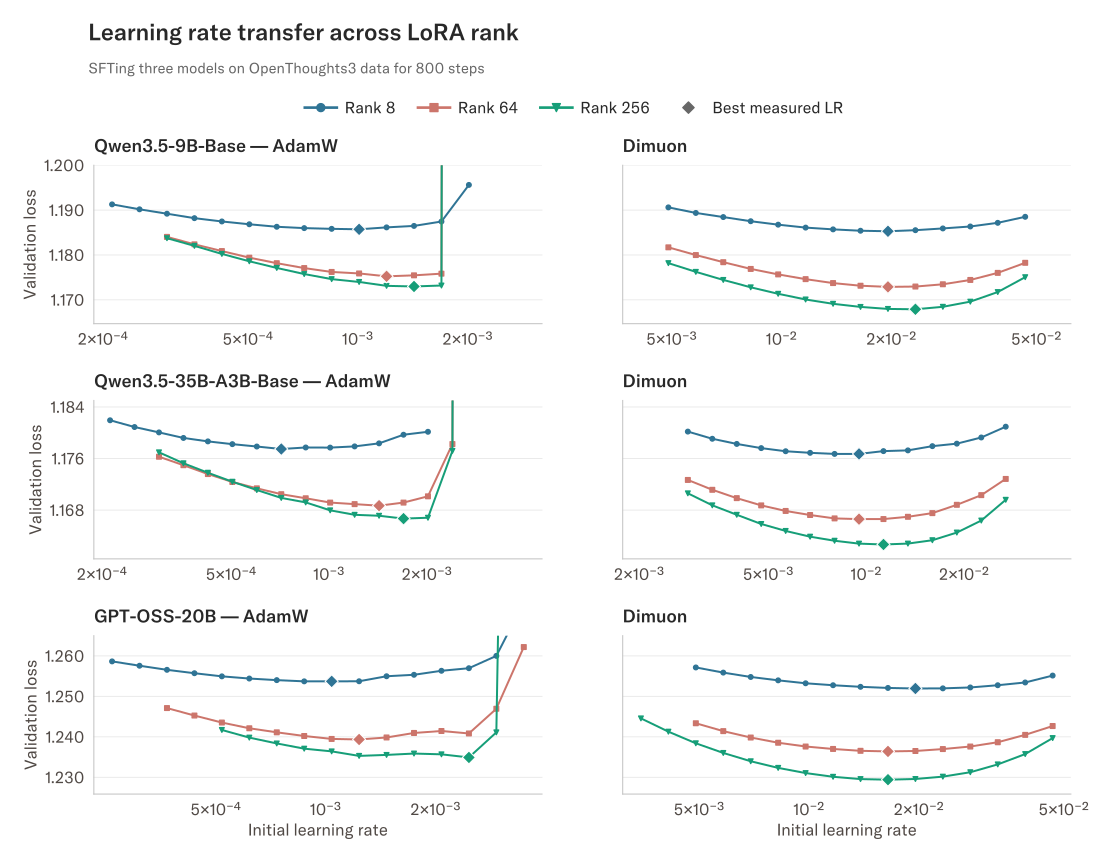
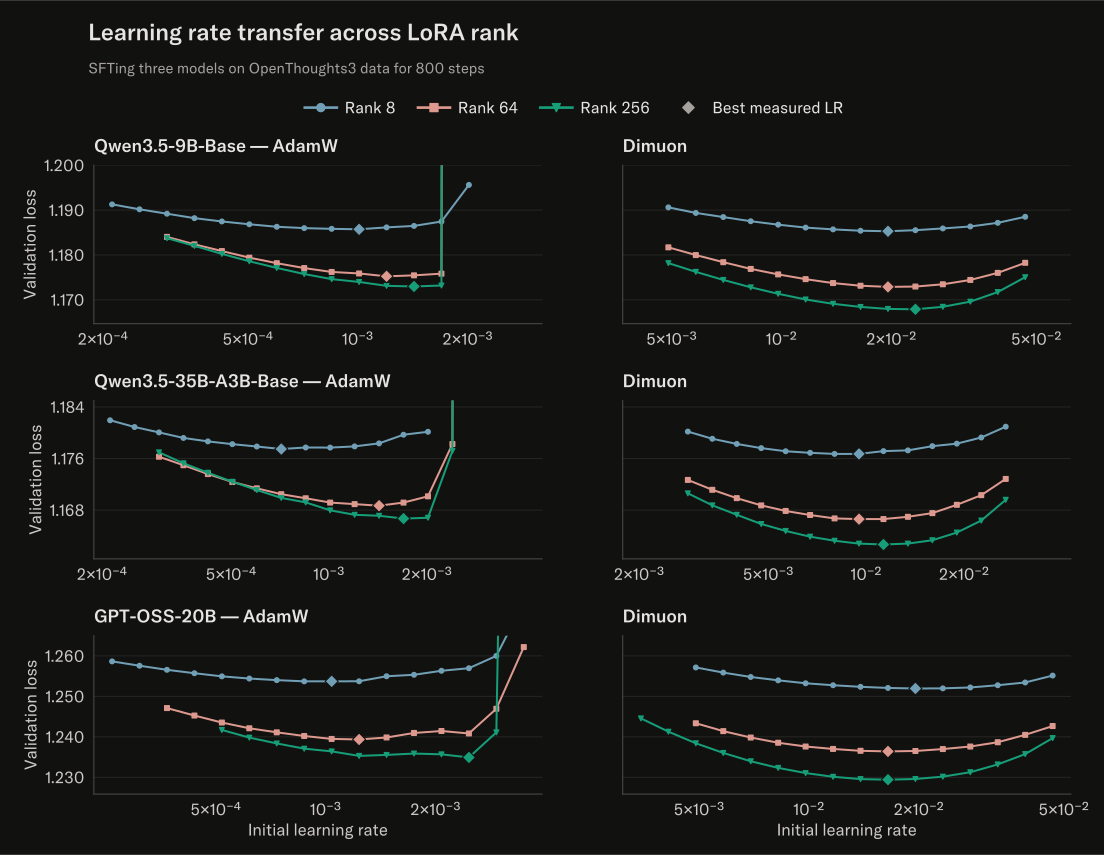
Figure 1. Learning rate across ranks: SFT on OpenThoughts3. These sweeps use linear learning rate decay to zero over 800 steps, with a batch size of 128 for a total of 102,400 training examples per run. Diamonds mark the best measured learning rates. Inputs were truncated to 8k tokens so the loss mostly measures reasoning prefixes. Runs use a single random seed.
Batch size dependence
For both AdamW and Dimuon, a good rule of thumb in SFT is to scale the learning rate with the square root of the batch size. If you 4x your batch size then try 2x your learning rate. The experiments below hold the training examples fixed and compare different batch sizes. They support this scaling rule for both optimizers in this setting.
For reinforcement learning, you may want to try scaling the learning rate with sqrt(num_problems). Getting this scaling right is the user's responsibility in Tinker.
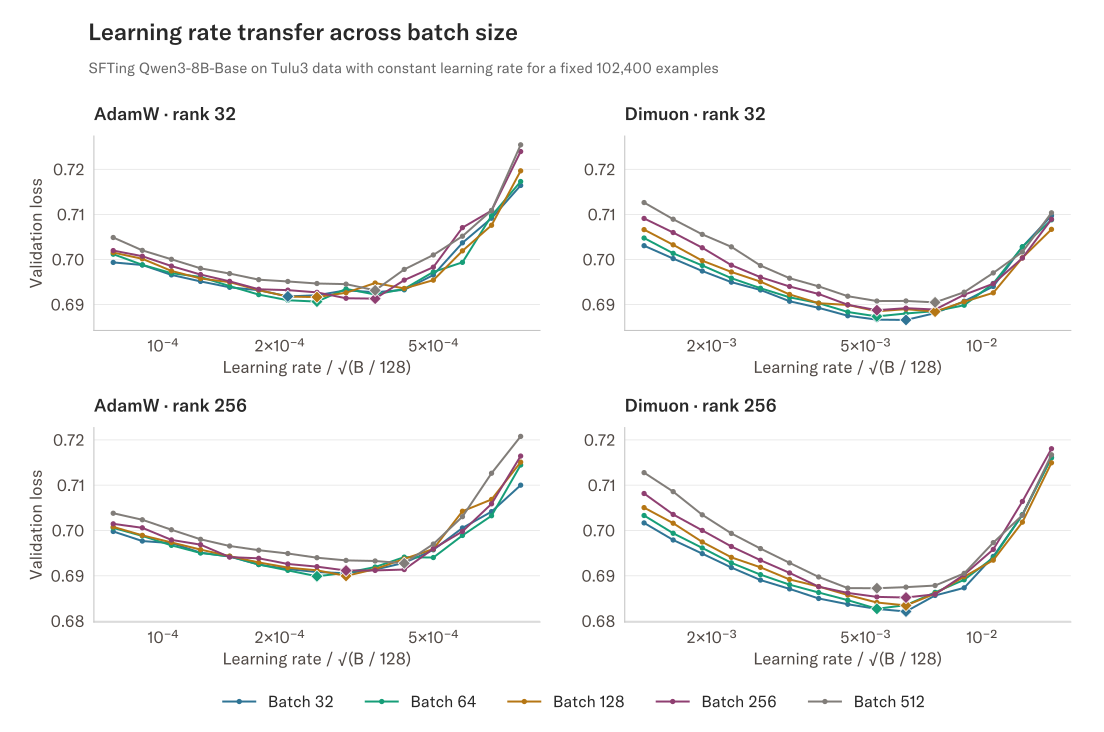
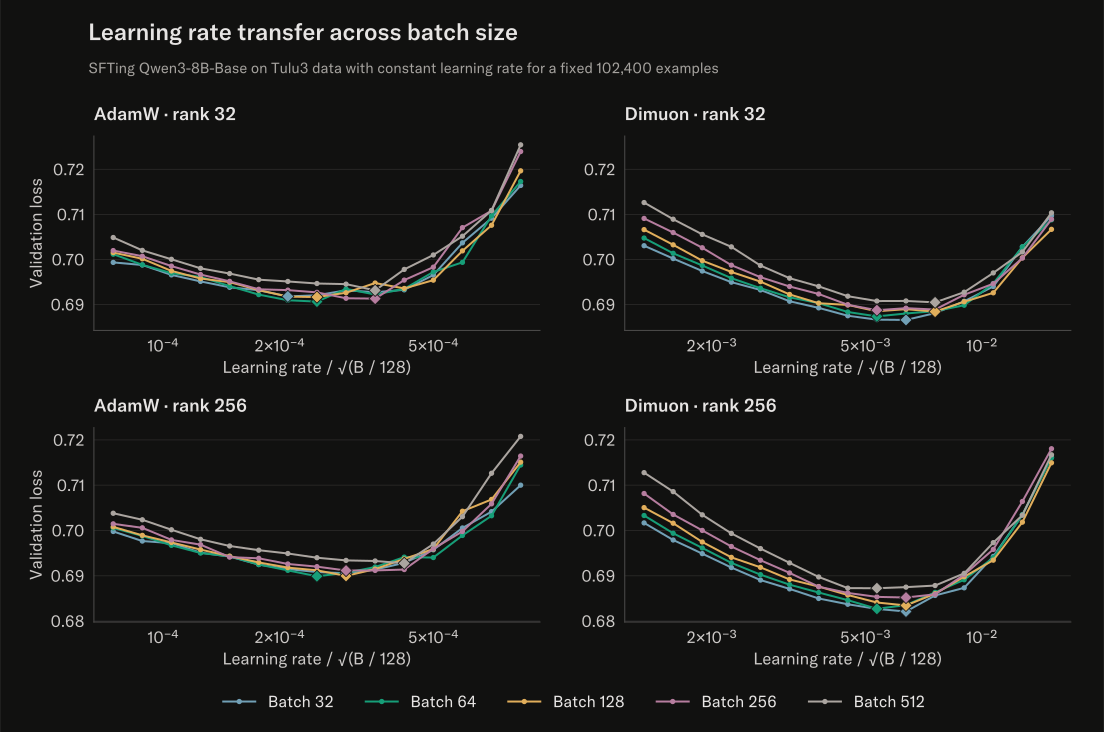
Figure 2. Learning rate across batch sizes. The experimental setup was Qwen3-8B-Base on Tulu3 data with MLP-only adapters, constant learning rates, and the same 102,400 ordered training examples per run. Batch sizes 32 to 512 therefore used 3,200 to 200 optimizer steps. Diamonds mark the best learning rate for each curve. The fact that the curves line up when plotted against learning rate per square root batch size indicates that the optimal learning rate should scale with square root batch size.
Switching optimizers midflight
To switch optimizers in an active Tinker session, start a new training client from a training checkpoint and pass the new optimizer:
sft_checkpoint = training_client.save_state("sft-complete").result()

rl_client = service_client.create_training_client_from_state(
    sft_checkpoint.path,
    optimizer=types.AdamOptimizerConfig(),
)
This loads the weights and starts with fresh optimizer state. To resume with the same optimizer and keep its state, use create_training_client_from_state_with_optimizer:
resumed_client = service_client.create_training_client_from_state_with_optimizer(
    sft_checkpoint.path
)
Training checkpoints saved with save_state include optimizer state, such as Adam's running averages. Sampler checkpoints saved with save_weights_for_sampler do not. If your learning-rate schedule depends on a step counter, save and restore that counter in your training code as well. See Manage Checkpoints for metadata and other save/load options.
FAQ
Does Dimuon help RL if I skip SFT?
Not in our experiments so far. It performs about the same as AdamW.
Is optimizer state reset between stages?
Yes, when you start a new training client with create_training_client_from_state. Use create_training_client_from_state_with_optimizer to resume with the same optimizer and keep its state. See Switching optimizers midflight.
Should I tune beta1 or grad_clip_norm?
For Dimuon, we recommend tuning only the learning rate. A training instability is more likely caused by the learning rate being too large. But you are free to try tuning the momentum or gradient clipping.
Quick reference
| AdamW | Dimuon | |
|---|---|---|
| Default | Yes | No |
| Select with | Default, or AdamOptimizerConfig() |
DimuonOptimizerConfig() |
| Step parameters | AdamParams |
DimuonParams |
| Observed benefit | — | Fewer steps in some SFT tests |
| Decent starting learning rate | 1e-4 |
1e-3 |
| What to tune | Learning rate | Learning rate |